
By Aayush Bajaj, US CPA · Founder, Grevx Consulting · Updated 17 November 2026
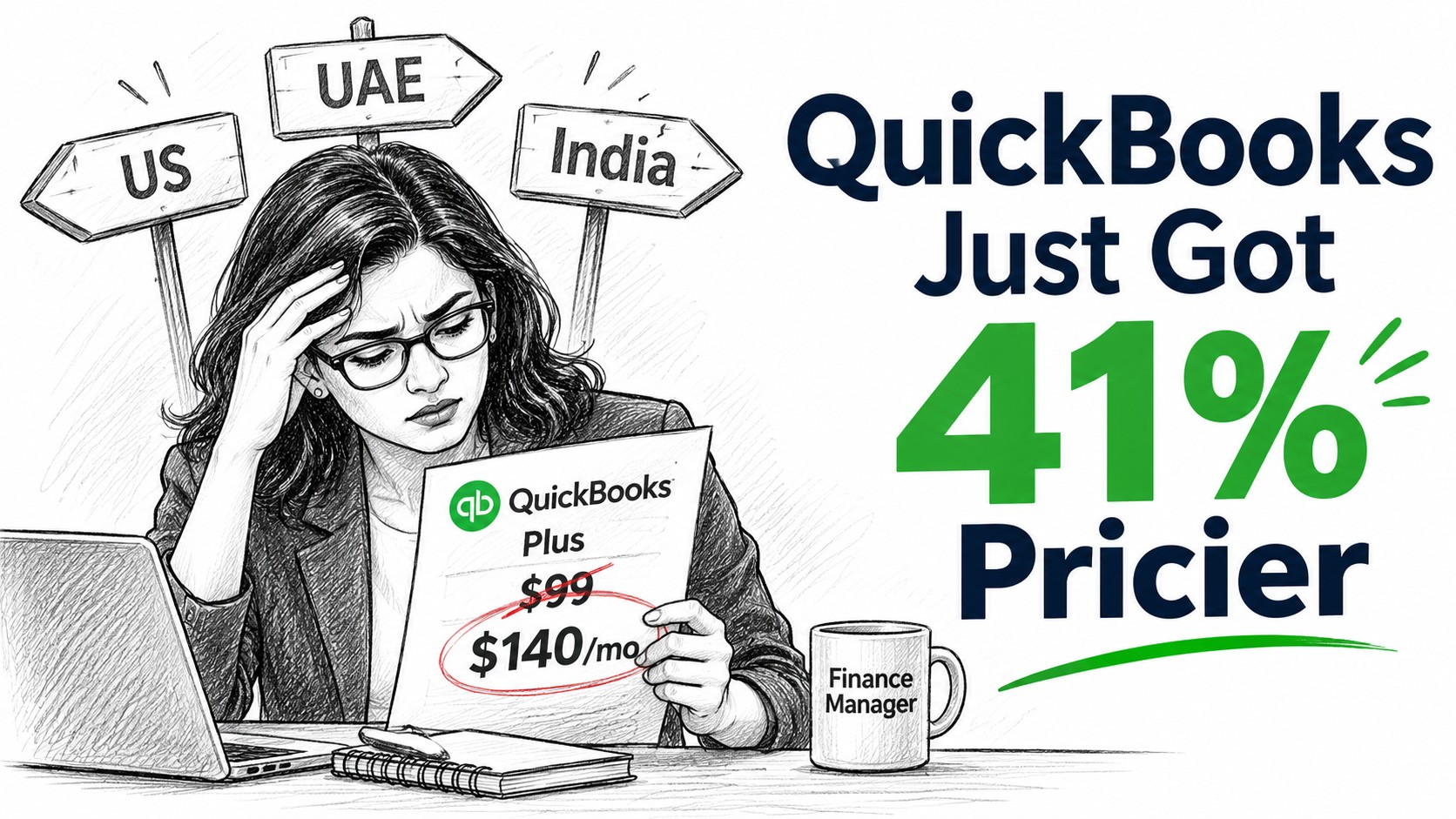
Until July 2025, QuickBooks Online Plus cost $99 a month. Today it costs $140.
That is a 41% rise in just over a year, for the same five users. If your renewal email surprised you this autumn, the cause is two price rises in a row: one in July 2025 and another for renewals from 1 August 2026.
A price rise alone is not a reason to switch. Moving accounting software takes time, and a bad migration costs far more than any subscription. But it is a good moment to ask a question most businesses never ask: are we on this platform because it fits, or because it is the one we started on?
That question has a different answer depending on where you operate. A US-only business, a Dubai trading company and an Indian group with a US subsidiary face three different decisions. QuickBooks is not even available in India.
This guide gives you:
- What QuickBooks changed in 2026, and what you now pay
- A 15-minute audit of your current bill
- The yearly cost of QuickBooks, Zoho Books and Xero for the same business at four sizes
- What changes if you operate in India or the UAE
- An honest look at where each platform wins
- A four-week plan to switch, if switching makes sense
The timing matters. The cleanest day to change accounting software is the first day of a financial year. For calendar-year businesses, that is 1 January 2027, about six weeks away.
What changed at QuickBooks in 2026
Subscription prices rose for the second year running. US list prices, monthly billing:
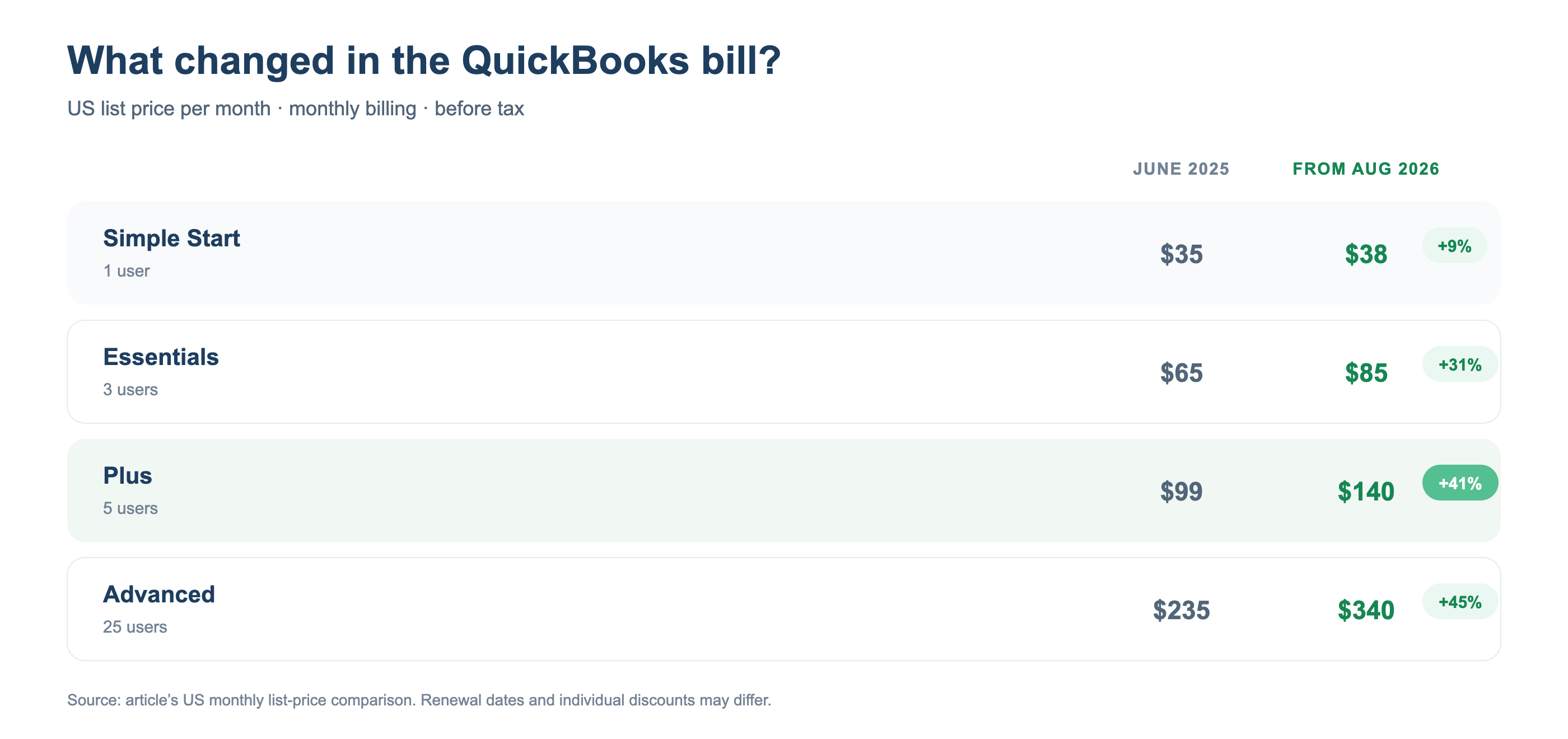
User caps make the jumps steeper than the chart suggests. Intuit does not sell extra seats. Your fourth user forces Essentials up to Plus, and your sixth forces Plus up to Advanced, which is $200 a month more.
Payroll got pricier too. QuickBooks Payroll is now sold as QuickBooks Workforce: $50 a month plus $7 per employee on the base plan, $88 plus $13 on Premium, and $134 plus $17 on Elite. The per-employee fees on Premium and Elite rose in July 2026.
Older Desktop versions lost their services. QuickBooks Desktop 2023 reached end of service on 31 May 2026. Payroll, payments, online banking, backup and live support stopped working for it, and security updates ended. Many Desktop users now have to choose a cloud platform anyway.
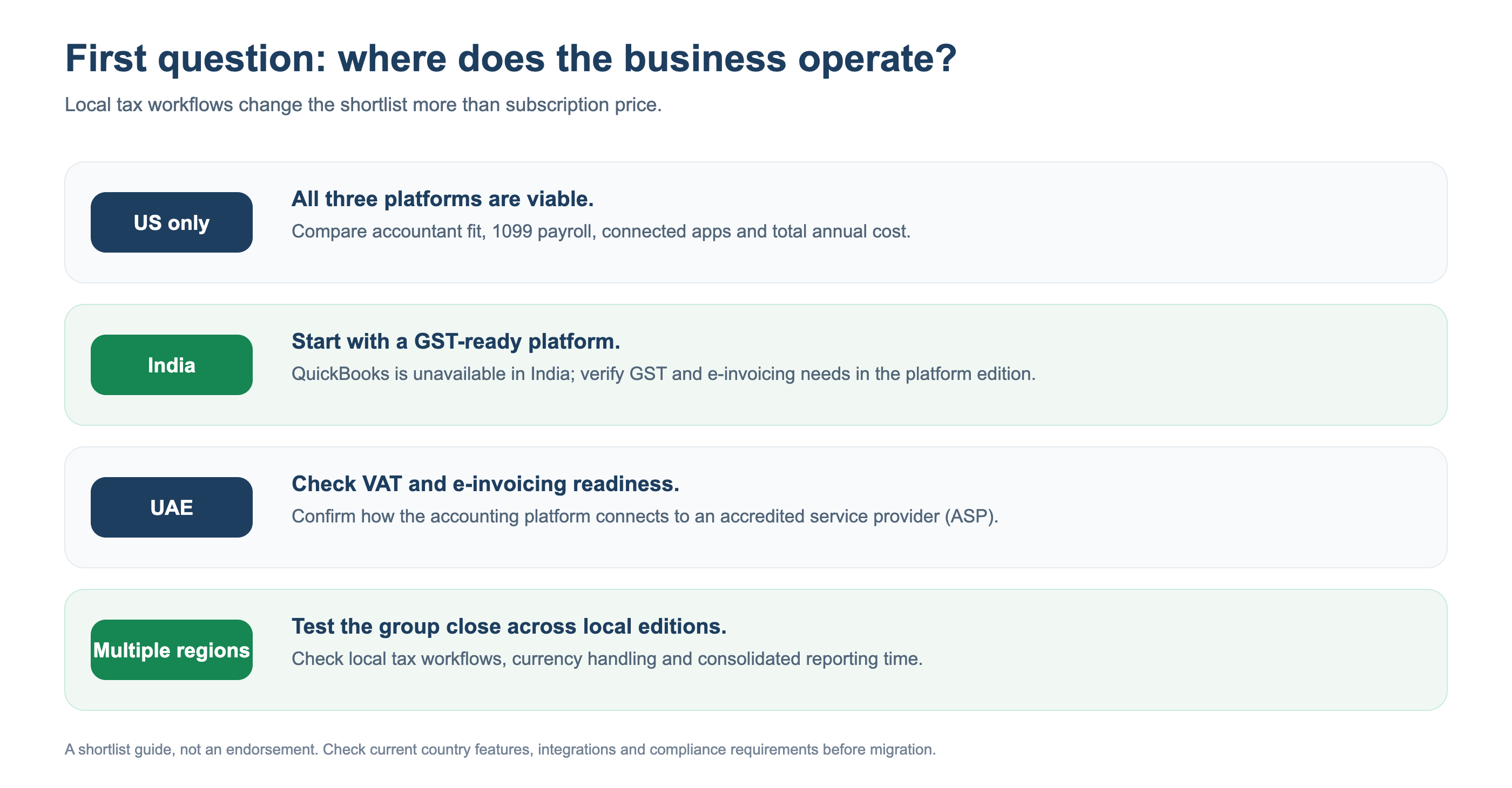
India is a different story. Intuit withdrew QuickBooks from India in 2023. For Indian businesses, the question is not whether to leave QuickBooks but which GST-ready platform to run on.
Before you compare anything: a 15-minute renewal audit
Most businesses compare list prices. The real saving is often found in your own bill first. Open your QuickBooks subscription page and answer five questions.
- Why are you on this plan: users or features? If you are on Plus only because you have four or five users, and you never use inventory, projects or budgets, you are paying $55 a month for seats, not software. Check which users actually logged in last quarter.
- Which add-ons are you paying for? Look for Enhanced Inventory ($40 a month on Simple Start and Essentials), Bill Pay Elite ($45 a month below Advanced) and payroll. Add-ons can quietly exceed the plan itself.
- What do you pay to get paid? Card and digital-wallet payments through QuickBooks cost 2.99%, and ACH costs 1%. On $50,000 a month of card receipts, that is about $1,500 a month, far more than any subscription.
- Which apps depend on QuickBooks? List every connected app: payment gateways, e-commerce, expense tools, CRM. Each one is a reconnection job if you move.
- When does your price actually change? New subscribers keep their starting price for six months, and the new price applies from the seventh invoice. Note the date your next increase hits.
Write the answers down. They tell you whether your problem is the platform, the plan or the add-ons, and only the first one needs a migration.
Three platforms, four business sizes, one honest comparison
Price pages are hard to compare because each vendor cuts its plans differently. QuickBooks limits users by plan. Zoho Books includes a set number of users and sells extra ones at $3 a month each. Xero includes unlimited users on every plan but keeps multi-currency and projects for its top plan.
So we priced the same business on all three. Figures are US list prices with monthly billing, per year, before tax, promotions and add-ons.
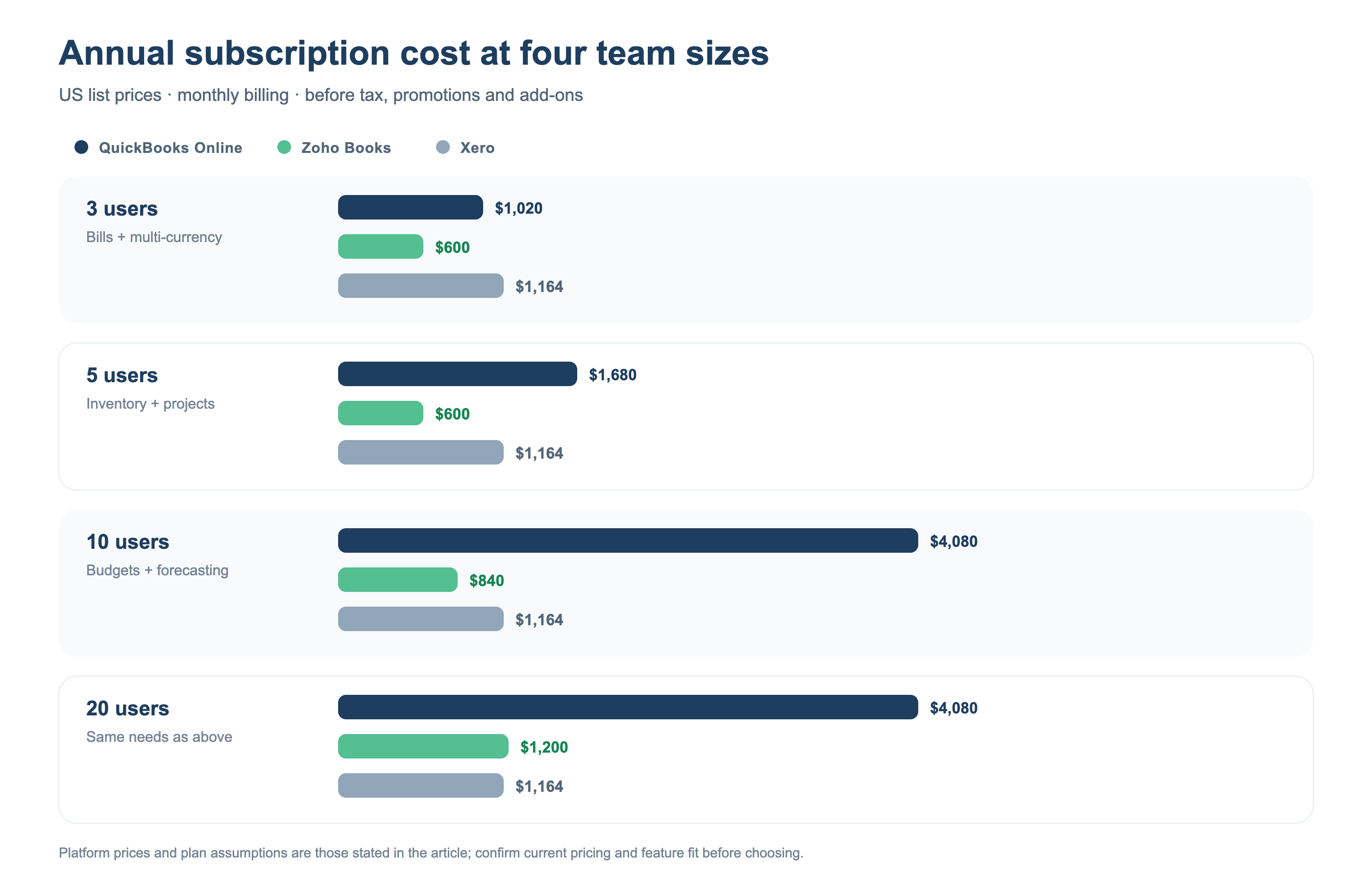
Plans assumed: QuickBooks Essentials (3 users), Plus (5) and Advanced (10 and 20). Zoho Books Professional (3 and 5 users) and Premium (10; 20 with 10 extra users at $3 each). Xero Established at every size.
Three things stand out.
Zoho Books is cheapest from 3 to about 15 users. The gap is widest at 10 users, where QuickBooks costs almost five times as much because Plus stops at five users.
Xero catches up as headcount grows. Unlimited users make Xero the cheapest of the three at around 20 users. Its inventory is basic, though, so check that before counting the saving.
QuickBooks is never the cheapest here, but that is not the whole story. The next sections explain where it still earns its price.
Does the saving pay for the move?
Subscription savings mean nothing if the migration costs more. Assume a clean migration takes about 20 hours of skilled time. At $60 an hour that is $1,200, a figure you should replace with your own quote.
| Moving from QuickBooks to Zoho Books | Saving per year | Months to recover $1,200 |
|---|---|---|
| 3-user business | $420 | 34 |
| 5-user business | $1,080 | 13 |
| 10-user business | $3,240 | 4 or 5 |
For a three-user business, price alone rarely justifies a move. From five users up, the move pays for itself within about a year. Annual billing makes the case stronger: Zoho Books Professional costs $40 a month and Premium $60 a month when paid yearly.
One country or three? Where the choice really changes
Where each platform genuinely wins
Cheaper is not the same as better. Each of the three is the right answer for someone.
QuickBooks Online
- Your accountant already lives in it. In the US, QuickBooks is the default for most small-business accountants. If your CPA firm runs every client on it, moving alone can slow their work, and their fees may reflect that.
- The largest app ecosystem. US banks, payment apps and industry tools usually build for QuickBooks first.
- Payroll for employees and contractors in one place. QuickBooks pays both W-2 employees and 1099 contractors. For contractor-heavy businesses, this alone can decide it.
- Easier hiring. A US bookkeeper who already knows QuickBooks is easy to find.
Zoho Books
- Lowest cost from 3 to 15 users, as the chart shows, with no $200-a-month cliff at the sixth user.
- Country editions built for local tax: GST and e-invoicing in India, VAT in the UAE and across the GCC, and sales tax in the US.
- One connected suite. Books shares data with Zoho CRM, Inventory, Payroll, Expense and Analytics, so sales, stock and accounts can live in one place without paying for integrations.
- AI on your real ledger. Zoho Books supports the Model Context Protocol (MCP), which lets AI assistants read your books and help with reports and routine actions.
- One limitation to note: Zoho Payroll covers all 50 US states for employees but, as of 2026, cannot pay US 1099 contractors.
Xero
- Unlimited users on every plan. For a business where many people need access (sales staff raising invoices, managers approving bills), this is Xero's clearest advantage.
- Strong in the US, UK, Australia and New Zealand, with a large accountant community in those markets.
- Payroll through Gusto, available as an add-on at $36 a month plus $6 per person.
- Watch the entry plan. Xero's Early plan allows only 20 invoices and 5 bills a month, and multi-currency needs the $97 Established plan.
A fair decision rule
Tick the statements that are true for your business. The platform with two or more ticks is your shortlist.
QuickBooks Online fits if:
- ☐ You operate only in the US
- ☐ Your accountant or bookkeeper works mainly in QuickBooks
- ☐ You pay 1099 contractors through payroll
- ☐ You depend on apps that only connect to QuickBooks
Zoho Books fits if:
- ☐ You have entities or customers in India, the UAE or the GCC
- ☐ Between 3 and 15 people need access to the books
- ☐ You already use Zoho CRM, Inventory or another Zoho app
- ☐ You want the lowest subscription cost for a small team
Xero fits if:
- ☐ More than 15 people need access to the books
- ☐ You operate in the US, UK, Australia or New Zealand
- ☐ Your accountant prefers Xero
- ☐ You are happy to run payroll through Gusto
Two platforms with two ticks each? Do not decide on price. Run both for one month on a copy of your data, and time how long your month-end close takes on each. The faster close wins, because staff time costs more than any subscription.
How to switch in four weeks without breaking your books
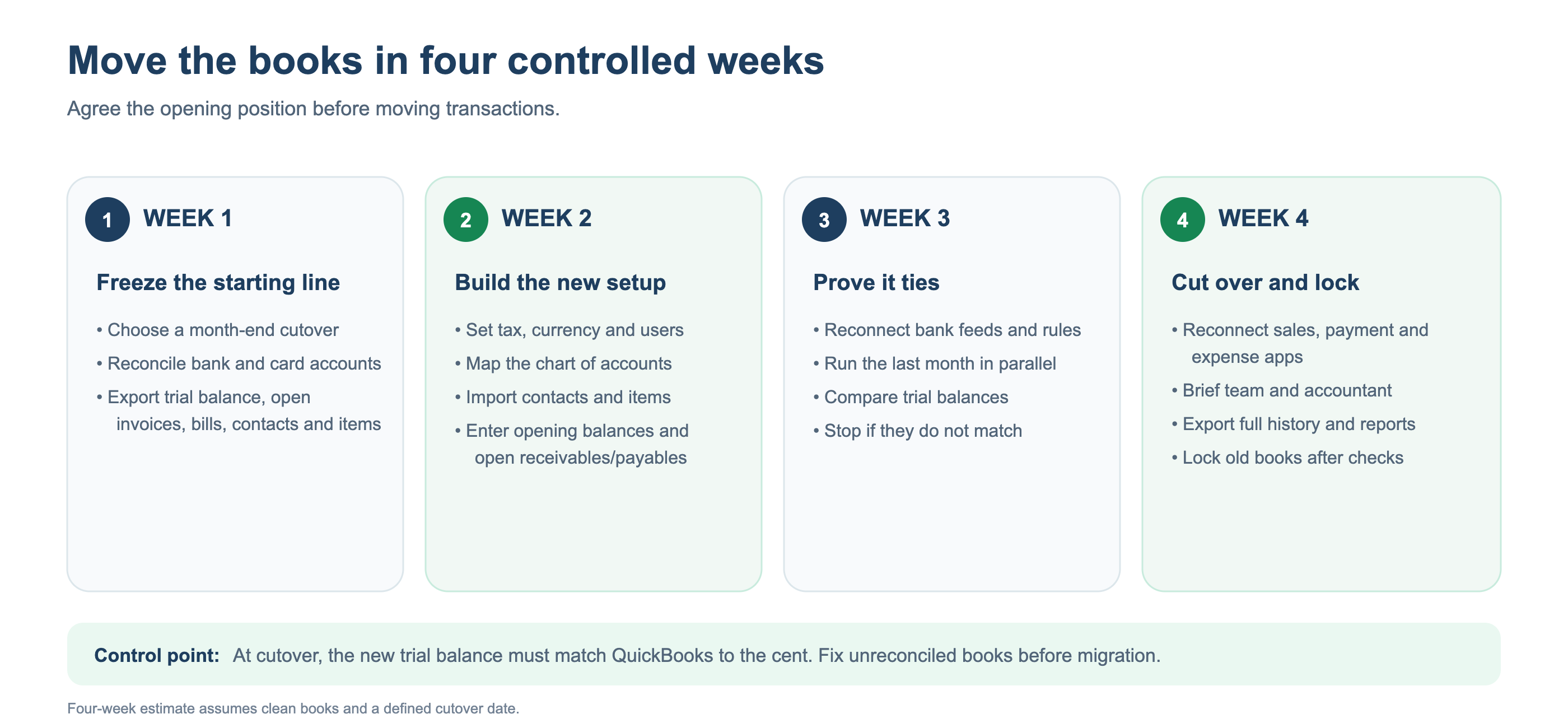
Most failed migrations fail for the same reason: the team moves transactions before agreeing the opening position. Work in this order, whichever platform you move to.
Week 1: Freeze the starting line. Pick a cutover date at a month end, ideally 31 December. Reconcile every bank and card account in QuickBooks up to that date. Export the trial balance, open invoices, open bills, customer and vendor lists, and the item list.
Week 2: Build the new setup. Create the organisation with its tax settings, currencies and users. Map your chart of accounts deliberately. This is the best chance you will get to remove the dead accounts that have piled up over the years. Import contacts and items, then enter opening balances and open receivables and payables.
Week 3: Prove it ties. Connect bank feeds and rebuild your bank rules. Run the last month in parallel on both systems. The new trial balance at cutover must match the QuickBooks trial balance to the cent. If it does not, stop and find out why.
Week 4: Cut over and lock the old books. Reconnect your payment, sales and expense apps. Brief your team and your accountant. Before you cancel QuickBooks, export a full set of reports and history; you will need them for audits and tax queries.
Four weeks assumes clean books going in. If your file has unreconciled months or an uncleared suspense account, fix that first. A migration moves your problems to the new platform. It does not solve them.
Frequently asked questions
How much did QuickBooks Online prices go up in 2026?
For renewals on or after 1 August 2026, Essentials rose from $75 to $85 a month, Plus from $115 to $140 and Advanced from $275 to $340. Simple Start stayed at $38. Per-employee payroll fees on the Premium and Elite plans rose in July 2026.
What is the cheapest alternative to QuickBooks Online?
For 3 to 15 users, Zoho Books is usually the cheapest of the main platforms. For larger teams, Xero's unlimited-user plans are competitive. The cheapest option is not always the best value: check your accountant's platform and your payroll needs first.
Is QuickBooks available in India?
No. Intuit withdrew QuickBooks from India in 2023. Indian businesses typically choose between Zoho Books, Tally and other GST-ready platforms.
Which accounting software is best for the UAE?
Choose a platform with a UAE VAT edition and a tested connection to an accredited e-invoicing service provider. E-invoicing becomes mandatory on 1 January 2027 for businesses with revenue of AED 50 million or more, and on 1 July 2027 for the rest.
Can I move my QuickBooks history to Zoho Books or Xero?
Yes. Move opening balances, open invoices and bills, contacts and items, and keep a full export of your QuickBooks reports for earlier periods.
When is the best time to switch?
At the start of a financial year: 1 January for calendar-year businesses. Switching mid-year splits one year's records across two systems and makes the year-end audit harder.
Want a second opinion before your renewal?
Grevx sets up cloud accounting, migrates books and runs month-end close for businesses and accounting firms across India, the UAE and the US. We are platform-neutral. If staying on QuickBooks is the right answer for you, we will say so.
If you are weighing a move before 1 January, book a call with us. Bring your answers to the 15-minute audit above, and we will tell you in one conversation whether switching is worth it.
Once your books are on a platform you trust, here are the 12 numbers every owner should see each Monday.
Prices are US list prices as published in October and November 2026, before tax and promotions. Vendors change prices often, so confirm current figures on each vendor's pricing page before deciding.
Need help applying this insight?
Our consulting team helps businesses translate strategy into practical action.
Talk to our team →

