

Imagine a company that has crossed ₹100 crore in revenue. Orders are flowing. New locations are opening. The finance team still closes the month with a workbook that only one person understands. A second spreadsheet reconciles the first. A third tracks the corrections to both.
The obvious reaction is: replace Excel.
That may be the wrong first move. The useful question is not, “Which spreadsheet should we buy software for?” It is, “Which repeated decision or handoff is now creating enough delay, error, or risk to justify a better system?”
Excel is often an excellent tool for exploration, modelling, and one-off analysis. Trouble begins when a file quietly becomes infrastructure: it receives operational data, applies business rules, grants approvals, and produces numbers people treat as authoritative. At that point, the risk lives in the process around the file, not in the grid itself.
Start with the work, not the software
Take one important workflow, supplier payments, sales commissions, inventory planning, or monthly reporting and follow it from the first input to the final decision. Ask the people who do the work where data arrives, who changes it, where it gets copied, who checks it, and what happens when something does not fit the normal pattern.
Then score the workflow against four questions:
- How often does it happen? A task performed every day deserves more attention than a one-off analysis.
- How much rework does it create? Count corrections, duplicate entry, review loops, and time spent chasing missing information.
- What is the consequence of an error or delay? A wrong internal estimate is different from an incorrect payment, missed filing, or unreliable board number.
- How predictable is the work? Stable rules are easier to automate safely than a process dominated by unusual cases and judgment.
This is not a vendor-selection score. It is a prioritisation tool. A high-volume process with clear rules and meaningful risk is a stronger candidate than a complicated spreadsheet that is used only once a quarter.
Three choices: automate, standardise, or keep judgment
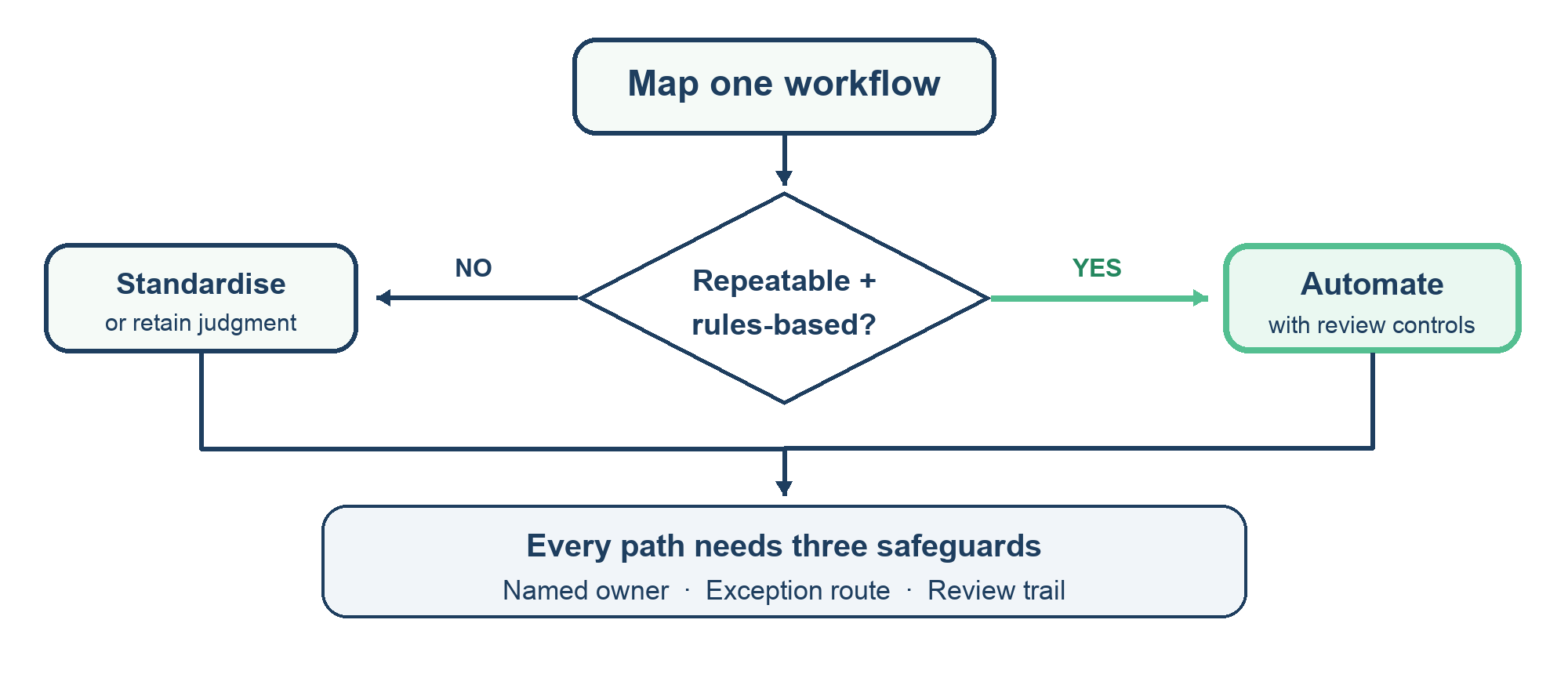
Most teams frame the decision as automate versus do nothing. There is a useful middle option: standardise the workflow first. If five people use five different definitions of “approved invoice,” software will make the inconsistency faster.
Use this practical split:
- Automate repeatable, rules-based steps such as moving approved data between systems, matching records, or sending reminders.
- Standardise work that is frequent but inconsistent. Agree on definitions, required fields, owners, and exception categories before selecting a tool.
- Keep a person responsible when the decision depends on context, a relationship, an unusual risk, or an explanation that cannot be reduced to a rule. A system can prepare evidence; a named person should own the judgment.
The best first automation is often not the most visible one. It may be the quiet handoff that creates re-keying, a reconciliation loop, or a week of waiting for someone to discover an exception.
The four safeguards that make automation trustworthy
Automation should reduce friction without removing accountability. Before a pilot goes live, define four things.
An owner. Who is accountable for the output, even if a system generated it? “The software did it” is not an operating control.
A source of truth. Which system or record wins when two sources disagree? Decide this before building integrations.
An exception route. What happens when a match fails, a value is outside an expected range, or a required document is missing? The exception should land with a person who can resolve it, with a clear deadline.
A review trail. Can the team see what changed, who approved it, and what evidence supported the final action? This matters most for payments, reporting, compliance, and decisions that affect customers or employees.
If the process cannot answer these questions, automate a smaller step first. The goal is controlled improvement, not a dramatic launch.
A practical 90-day sequence
In the first two weeks, map the workflow and establish a baseline: turnaround time, number of handoffs, rework, exceptions, and error impact. In weeks three and four, simplify the process and agree on definitions. Remove duplicate checks that do not reduce risk; keep checks that catch meaningful errors.
Next, pilot one narrow step with a small group. Run the automated output alongside the existing process long enough to compare results. Track false matches, missed exceptions, time saved, and the work that moved downstream. If the pilot saves time in one team but creates extra review in another, it has moved the bottleneck rather than removed it.
Only then expand. Name the process owner, publish the exception route, train users, and set a review date. A useful success measure is not “we automated 12 tasks.” It is “the close is more dependable, payment exceptions reach the right person sooner, or leaders can make the decision with current data.”
The decision to take to your next leadership meeting
Bring one workflow not a shopping list of software to the room. Show how it works today, where time and risk accumulate, and which step you propose to change first. Ask the team to agree on the owner, the control that must remain, and the measure that will prove the change helped.
That is how a spreadsheet-heavy company begins to automate intelligently: by making the process visible before making it faster.
Need help applying this insight?
Our consulting team helps businesses translate strategy into practical action.
Talk to our team →